Joyroom JR-X15 Pro Stylus Pen for iPad | Tilt | Magnetic Attach | USB-C 15-Min Charge
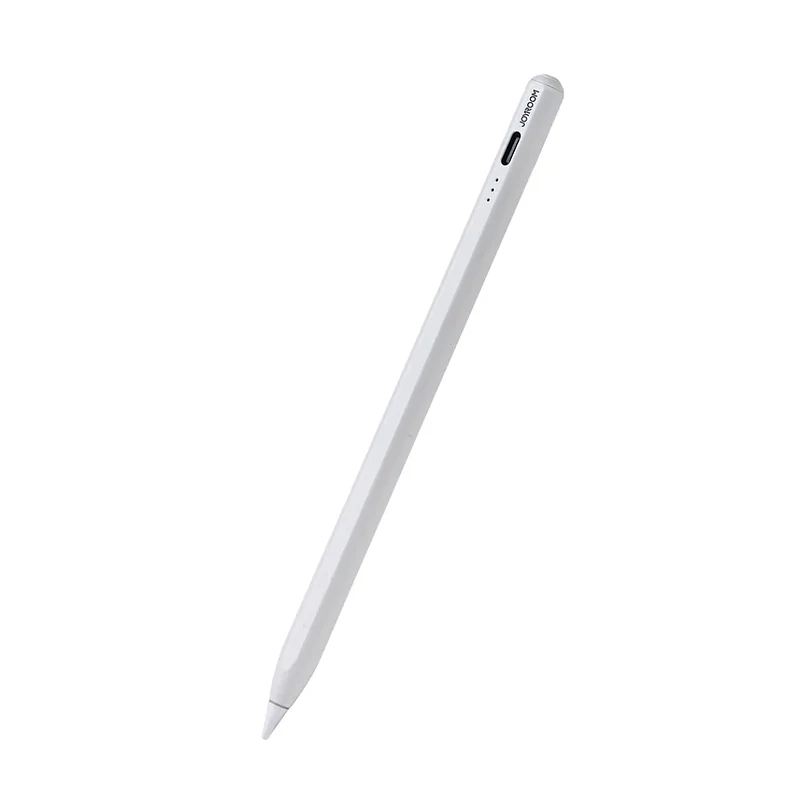
Identity: the sealed carton prints “Active Capacitive Stylus Pen · JR-X15”. “JR-X15 Pro” is the regional reseller alias for the same pen — CairoVolt lists both names, and holds you to the code printed on the box you receive. Store SKU JX01.
Quick Summary
- The magnet PARKS, it does not charge. The pen snaps to a supported iPad’s flat side rail for storage; charging is through the USB-C port at the top of the barrel. This is the single most common confusion with Apple Pencil 2, which does charge on the rail.
- Tilt YES (vendor-stated) · Pressure NO · Bluetooth pairing NO · MFi NO. iPadOS reports true stylus pressure only for Apple Pencil-class hardware, so no third-party active capacitive pen in this price class provides it. Fine for notes, PDF mark-up, signatures and line art; wrong for pressure-driven painting.
- Vendor-published figures, not CairoVolt measurements: Joyroom’s own page lists 130mAh, a 15-minute USB-C charge, ~10h use, 166mm × Ø9mm, 15g, aluminium alloy + plastic, and a four-nib pack. Reseller pages under the “Pro” name print 125mAh / 12h / 30-min charge / 2 spare nibs instead. We publish the conflict rather than averaging it.
- iPad ONLY. The printed compatibility table covers the 2018–2021 generations by A-number (iPad Pro 12.9 & 11, iPad Air 3–4, iPad 6–9, iPad mini 5–6). iPad 10th gen, iPad Air M1/M2, iPad Pro M2/M4 and iPad mini 7 are NOT on the carton list. Not an S-Pen substitute — no Galaxy Tab / Xiaomi Pad / MatePad / Windows support.
- Unverified feature flag: a Joyroom marketing slide in this listing’s own image set advertises tap shortcuts (click → home, double-click → multitasking). The published JR-X15 spec sheet documents no Bluetooth radio, and iPadOS grants those gestures only to paired hardware. The documented function of the top touch area is power on/off. Test the shortcuts inside the return window.
- Egypt fit (1199 EGP): AUC / GUC / Cairo University lecture notes, PDF mark-up and form signing on an iPad 7/8/9 or Air 3/4 — the generations most common in Egyptian student hands. Replaceable threaded tips matter here: a worn tip is what starts scratching a screen protector.
How this fits Egyptian use — deep dive (airlines · heat · electricity)
CairoVolt is an independent retailer — this pen carries our store warranty, not a manufacturer or agent warranty. At 1199 EGP the JR-X15 Pro is the Egyptian answer to “I want to write and annotate on my iPad without Apple Pencil money”, and it is honest about where that budget stops. RIGHT FOR: (1) UNIVERSITY LECTURE NOTES — AUC, GUC, Cairo University, Ain Shams: handwriting into GoodNotes / Notability / Apple Notes on an iPad 7, 8, 9 or Air 3/4, which are the generations actually circulating in Egyptian student hands and are all on the carton compatibility list. (2) PDF MARK-UP AND SIGNING — annotating course packs, contracts and delivery paperwork, and signing a PDF properly instead of pasting a photograph of a signature. (3) SCHOOL AND HOME LEARNING — a child writing Arabic and English letter forms on an iPad without smearing a palm across the screen, with a tip you can replace for a few pounds instead of replacing the pen. (4) THE ANTI-LOSS CASE — the magnet is the underrated feature: a stylus that parks on the iPad rail is a stylus that does not roll off a lecture desk, vanish into a bag, or get sat on in a microbus. (5) LINE ART, MIND MAPS AND DIAGRAMS — clean vector-style strokes, storyboards, engineering sketches and flowcharts, where line weight comes from the tool you pick in the app rather than from how hard you press. (6) THE SECOND PEN — a spare kept in a bag or at the office so a dead Apple Pencil does not cost you a lecture, at roughly a fraction of a replacement Apple Pencil. WRONG FOR: (7) PRESSURE-DRIVEN PAINTING IN PROCREATE — there is no pressure sensitivity and there is no way to add it; if your brushwork depends on pressure curves, buy an Apple Pencil and do not let anyone talk you out of it. (8) ANDROID AND WINDOWS TABLETS — Galaxy Tab, Xiaomi Pad, Huawei MatePad, Lenovo Tab, Surface: this pen is not designed for them and is not an S-Pen alternative. (9) THE NEWEST iPADS — iPad 10th generation, iPad Air M1/M2, iPad Pro M2/M4 and iPad mini 7 are absent from the carton compatibility table. Ask us before ordering for one of those rather than assuming a newer iPad is automatically covered. (10) ANYONE EXPECTING RAIL CHARGING — if the appeal is “it charges when I stick it to the iPad”, this is the wrong pen: it parks on the rail and charges over USB-C. CAIRO HEAT: Cairo July–August mean highs sit around 35°C (WeatherSpark). Do not leave the pen on a car dashboard or a sunlit balcony table — a small lithium cell in a sealed aluminium barrel is exactly the shape you do not want to cook, and heat is the fastest way to shorten any stylus battery. Charge it indoors and let it cool before charging if it has been in the sun. CHARGING IT: USB-C at the top of the barrel. Any 5V USB-C source works — a laptop port, a Joyroom or Anker wall charger, or a power bank on a long study day. It draws a small current, so it does not need and does not benefit from a high-wattage PD charger. TIPS AND SCREEN CARE: keep the screen clean and inspect a tip before fitting it. Grit trapped under a worn tip, not the stylus itself, is what marks a screen protector. Replace the tip when writing starts to feel scratchy. BUYING CHECK: read your iPad model number in Settings → General → About and match the A-number against the printed table before you order — an unsupported iPad is the number-one reason a stylus comes back. WHAT WE DID NOT INVENT: no CairoVolt runtime, charge-time, weight or latency measurement exists for this SKU — we have not bench-tested it. No pressure-sensitivity claim. No “works with all tablets” claim. No merged battery figure papering over the 130mAh / 125mAh disagreement between Joyroom and reseller listings.
Delivery to Cairo: Estimated 1–2 business days
Return or exchange within 14 days of delivery under the return policy