
 CairoVolt Team
Soundcore R100 — Sudden Volume Drop and Common Earbuds Problems Troubleshooting Guide
The Anker Soundcore R100 is an incredibly popular budget model in Egypt. In this comprehensive guide, we show you how to fix low volume, clean earwax, and perform a factory reset.
TL;DR: The Soundcore R100 does not support the companion app. To fix sudden volume drops, press and hold the touch controls on both earbuds for 2 seconds to toggle EQs, or clear earwax from the metal mesh. For connection issues, hold the case button for 10 seconds to factory reset.
The Soundcore R100 is one of the most successful budget earbuds in the Egyptian market, courtesy of Anker's build quality and budget pricing. (CairoVolt does not stock the R100 right now — this guide is for fixing one you already own.) However, like any TWS earbuds, users frequently run into technical issues such as a sudden volume drop in one ear, a single earbud refusing to connect, or charging issues. In this technical troubleshooting guide by CairoVolt, we walk you through the verified steps to resolve these common R100 problems and address key misconceptions regarding its software compatibility.
Important Fact: The Soundcore R100 does not support the companion mobile application. All customizations, equalizer modes, and troubleshooting steps must be performed manually via the hardware touch controls and case buttons.
Soundcore R100 Verified Technical Specifications
Understanding the hardware layout of your R100 is helpful before performing troubleshooting procedures:
| Technical Metric | Verified Specification |
|---|---|
| Bluetooth Generation | Bluetooth 5.3 |
| Driver Diameter | 9.2mm Dynamic Driver |
| Earbud Runtime | Up to 10 hours continuous playback |
| Total Runtime (with Case) | Up to 50 hours total runtime |
| Soundcore App Support | ❌ Not Supported |
| IP Rating | IPX5 Sweat and Splash Resistant |
Detailed Comparison: Soundcore R100 vs Soundcore R50i
Many buyers in the Egyptian budget market compare the R100 to the R50i since they occupy a similar price bracket. Here are the key differences:
- App Integration: The R50i clearly wins here as it fully supports the official Soundcore application for EQ adjustments, control customization, and OTA updates. The R100 does not connect to the app at all.
- Acoustic Driver Size: The R50i features a larger 10mm dynamic driver, yielding a slightly punchier, warmer bass response. The R100 features a 9.2mm driver that delivers a more balanced mid-range.
- Stem and Case Ergonomics: The R100 features a slightly longer, glossy stem design that provides excellent physical stability. The R50i offers a more compact matte housing with a shorter stem.
Problem #1: Sudden Volume Drop in One or Both Earbuds
A sudden decrease in volume is the single most common complaint reported by R100 users. This issue is typically caused by one of three factors:
- Accidental Onboard EQ Shift: The R100 features three onboard EQ profiles hardcoded into the internal DSP (Soundcore Signature, Bass Booster, and Podcast). Because there is no app, you switch between these modes by holding the touch panel on both earbuds simultaneously for 2 seconds. Users often trigger this gesture accidentally. If the earbuds shift to "Podcast" mode, the bass is cut, making music sound quiet. Hold both panels for 2 seconds to cycle back to the baseline Soundcore Signature mode.
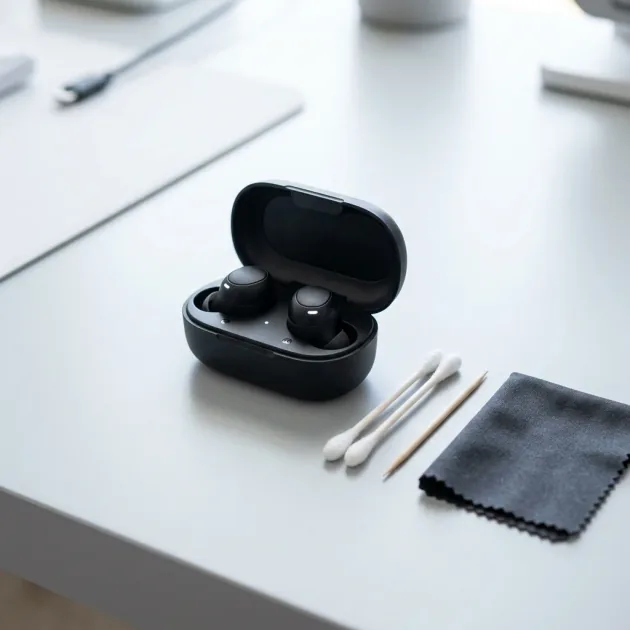
- Acoustic Mesh Blockage (Wax and Dust): Egypt's hot, humid weather accelerates dust accumulation and earwax buildup. The fine metal mesh grilles on the nozzle can get completely clogged, blocking acoustic output. To fix this, remove the silicone ear tips and use a dry, soft-bristled toothbrush to gently sweep away debris. For stubborn wax, apply a single drop of 70% isopropyl alcohol to a cotton swab, wipe the mesh, and let it dry completely before playing music.
- Android Absolute Volume Discrepancy: Sometimes, Android operating systems fail to synchronize the phone's software volume slider with the earbud's internal hardware volume. To resolve this, activate Developer Options on your Android device, search for "Disable Absolute Volume", toggle it on, and restart your device to gain full volume control.
Optimizing Call Quality and Microphone Performance
The R100 features dual microphones paired with an AI uplink noise reduction algorithm. For the best outgoing clarity in Egypt's loud streets:
- Mic Orientation: Always wear the earbuds at an angle where the stems point down toward your mouth, maximizing voice pick-up.
- Network VoLTE Settings: Enable VoLTE (Voice over LTE) on your carrier network. This ensures high-definition voice data transfer, minimizing digital compression.
- Handling Wind Interference: The AI algorithm is good at filtering ambient traffic rumble, but direct wind (e.g., from an open microbus window) can cause the AI to over-compress your voice. Cupping your hand over the earbud during calls helps filter direct wind.
Problem #2: One Earbud Not Working or Syncing
If one earbud remains silent or fails to pair with the other, a factory reset clears the internal Bluetooth memory and forces the buds to resynchronize:
- Open your smartphone's Bluetooth settings and "Forget" or delete the Soundcore R100 from your paired devices list.
- Place both earbuds back into the charging case and ensure the charging indicators light up. Keep the case lid open.
- Locate the physical button on the charging case. Press and hold this button for 10 seconds without releasing.
- Watch the LED lights on the earbuds. They will flash red 3 times to signal that the factory reset was successful.
- Close the case lid for 5 seconds, open it, and pair the earbuds to your phone. Both sides should now play audio simultaneously.
Understanding the R100 Case and Earbud LED States
The built-in LED indicators communicate status updates for charging, battery level, and pairing:
- Case Indicator (Lid Opened): A solid white LED indicates the battery is healthy (above 10%). A solid red light signifies low battery, meaning you need to charge the case immediately.
- Case Charging Status: A flashing red light indicates the case is actively charging. A solid white light means it has reached 100% capacity.
- Earbud Indicators: A slow white pulse indicates pairing mode. A red flash means the earbud battery is low and needs to be returned to the case.
Problem #3: Bluetooth Stuttering and Connection Drops
Audio dropouts are typically caused by local interference or Bluetooth cache clutter on your device:
- Clear Bluetooth Cache (Android): Navigate to Settings ← Apps ← System Apps. Search for "Bluetooth" or "com.android.bluetooth", tap Storage, and select "Clear Cache". Restart your phone and pair the earbuds.
- RF Interference: Bluetooth operates on the crowded 2.4GHz band. Move away from high-power Wi-Fi routers or active microwave ovens if you notice connection drops.
Problem #4: Charging Case or Earbuds Refusing to Charge
If your earbuds fail to charge when placed inside the case, try the following remedies:
- Clean the Golden Contacts: Dust, sweat, and body oils can form a non-conductive layer on the golden charging pins. Clean the charging pads on the earbuds and inside the case using a dry cotton swab.
- Use Safe Charging Adapters: High-wattage fast-chargers (33W, 67W, or higher) can trigger the case's over-temperature protection, halting charging. Always charge the case using a standard 5W power adapter or a computer USB port.
CairoVolt store warranty and support in Egypt
CairoVolt does not stock the Soundcore R100 right now, so if you bought an R100 elsewhere, your warranty is with the seller you bought it from — keep the invoice and the retail box with the printed Serial Number. Soundcore models CairoVolt does sell (such as the Soundcore R50i) come with an invoice and CairoVolt's written store warranty (duration shown on each product page) against manufacturing defects. CairoVolt is an independent online retailer.
Important maintenance note: To prevent warranty rejection, ensure the earbuds are never exposed to direct submersion or excessive water ingress, and do not attempt to disassemble the charging case yourself. Always keep your written purchase receipt to identify the seller responsible for servicing your product.
If You Buy a Replacement From CairoVolt
If you are looking for a replacement pair we stock, here is what you get:
- CairoVolt's written store warranty: the duration is shown on each product page and covers manufacturing defects.
- Delivery and cash on delivery: delivery commonly takes 1–6 business days depending on governorate (Cairo/Giza 1–2), with cash on delivery and 14-day returns per the published return policy (earbuds and audio products that have been opened or used are not returnable for hygiene reasons).
🛒 Related Original Products (CairoVolt's written store warranty):
Original Soundcore models at CairoVolt: Soundcore R50i Earbuds · Soundcore P20i Earbuds · Soundcore R50i NC Earbuds.
CairoVolt Team
Tech Editor
Frequently Asked Questions
Can I connect the Soundcore R100 to the official app to adjust settings?▼
What is the correct factory reset procedure for the Soundcore R100?▼
How do I resolve a sudden volume drop on my Soundcore R100?▼
What type of charger is recommended for charging the R100 case in Egypt?▼
Ready to Buy?
Browse available products and review specifications and CairoVolt warranty terms before ordering
Related products
Anker Soundcore R50i | 10mm Drivers | 30h Battery | In-Ear
Soundcore P20i | 10mm Drivers | 30h Battery | Bluetooth 5.3
Soundcore R50i NC A3959 Earbuds | Manufacturer-Listed ANC and Battery | Phone-Stand Case
Soundcore V20i | Open-Ear Ear-Hook | 16mm BassUp | 36h | LED | IP55 | BT 5.3
Soundcore P25i | 10mm BassUp | 30h Battery | Ultra-Light
Soundcore Liberty Buds | Semi-In-Ear | ANC 3.0 | 11mm LDAC | BT 6.1 | 30h
Browse the categories this article covers
Related Articles

Why Is This One of the Most Popular Earbuds in Egypt? Complete Soundcore R50i Review with Numbers
Read more →
ANC Noise Cancellation in Budget Earbuds Review — Does It Actually Work in Egyptian Streets?
Read more →